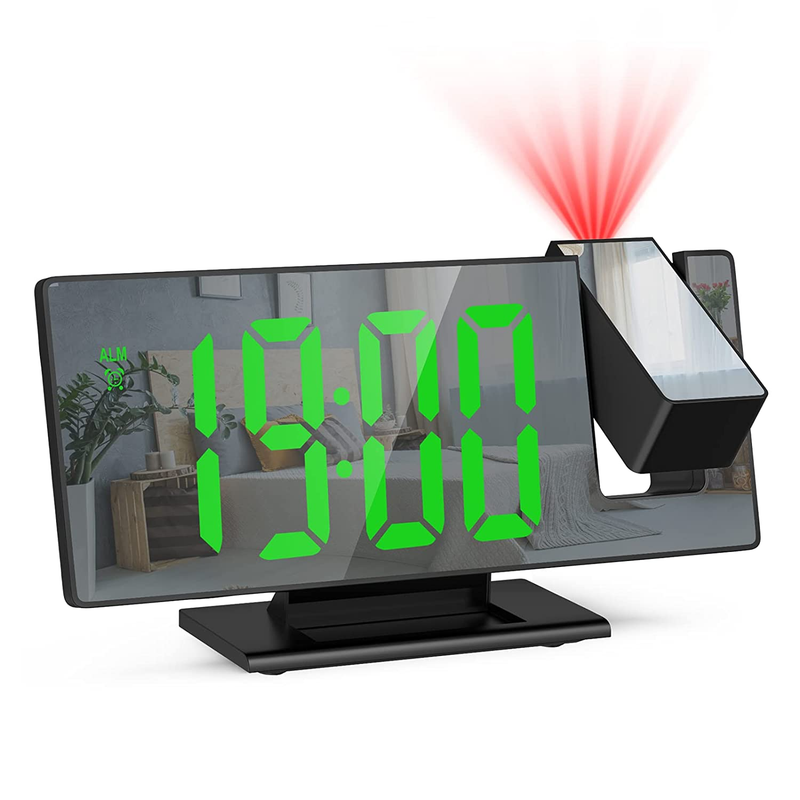
Digital Alarm Clock
Adjustable Brightness Temperature Display 12/24h For Home
USD $16.95
Condition : New
Free Shipping
{{variant_type_name}} :

Notify me when the price drops
We will email you if we find a lower price on this product!
Digital Alarm Clock Adjustable Brightness Temperature Display 12/24H for Home ⏰ Large Display & Multi-function: Digital alarm clock with large LED display (6.3"x0.7~1"x2.36"), which lets you check the time clearly at a glance even it is far from you. Our smart clock with 5 mode: clock mode, date mode, temperature mode, night mode (ON/OFF), alarm mode. It is suitable to mount it below your TV, office, bedroom. ⏰ Adjustable Brightness: Just press UP/DOWN to adjust the 3 levels of brightness (Bright/ Medium /Low). Choose the brightness you like! Besides, in the night mode, the bedside alarm clock will auto dim during 18:00-6:00, or you can set another periods of time for your need. Just press and hold the snooze button for more than 3 seconds to turn off the display to prevent the screen from lighting up at night to interfere with sleep. ⏰ 3 Alarm Modes & Snooze: There are 3 alarm modes to choose when you want it to wake you up at fixed time: Monday to Friday/Monday to Saturday/Monday to Sunday. Just long press "ALARM", and then use the "UP" and "DOWN" buttons to adjust the hour/minute/snooze time/working day mode. In addition, you can get 1~60 minutes of extra sleep by pressing the "SNOOZE" button when the alarm goes off, or press any other key to cancel the alarm. ⏰ Voice Control: The function of voice control only works when the clock is powered by battery. You can activate the display by make some noise like clapping your hands, rapping on the table or touching the clock. In addition, the LED alarm clock will automatically turns off after 16 seconds of inactivity. Please be aware that it will lose time memory when the power is off. ⏰ USB/Battery Powered: With a USB cable (included) and 3 AAA batteries (excluded), this LED alarm clock has two power source which is convenient and useful. ★NOTE: 𝐓𝐡𝐞 𝐬𝐜𝐫𝐞𝐞𝐧 𝐰𝐢𝐥𝐥 𝐭𝐮𝐫𝐧 𝐨𝐟𝐟 𝐢𝐧 𝟏𝟔 𝐬𝐞𝐜𝐨𝐧𝐝𝐬 𝐢𝐧 𝐛𝐚𝐭𝐭𝐞𝐫𝐲 𝐦𝐨𝐝𝐞. 𝐈𝐟 𝐲𝐨𝐮 𝐰𝐚𝐧𝐭 𝐭𝐨 𝐤𝐞𝐞𝐩 𝐭𝐡𝐞 𝐬𝐫𝐞𝐞𝐧 𝐚𝐥𝐰𝐚𝐲𝐬 𝐛𝐞𝐢𝐧𝐠 𝐨𝐧, 𝐩𝐥𝐞𝐚𝐬𝐞 𝐮𝐬𝐞 𝐭𝐡𝐞 𝐩𝐨𝐰𝐞𝐫 𝐜𝐚𝐛𝐥𝐞 𝐟𝐨𝐫 𝐩𝐨𝐰𝐞𝐫 𝐬𝐮𝐩𝐩𝐥𝐲 🎁 How to Set the Clock: If you find that it is a little difficult to set, just contact us, we are alawys here to solve your problem. Also, you can download the "User Manual" on this Page.
Product Description JXTZ alarm clock for Bedroom is easy to setup. Great for Gifts! The bedside alarm clock with compact size fits for any decoration. Perfect for home, hotel, office, nightstand, bedroom, and below your TV Voice Control: The display screen can be opened by voice control only when the battery is dry, and it will be closed automatically after 16S. Night Anti-disturbance Mode: In normal mode, long press the snooze key for more than 3 seconds to turn off the display to prevent the bright screen from disturbing sleep at night. Power Saving Mode: Under battery power supply, the display automatically turns off after 16 seconds without operation and enters power saving mode. 3 Brightness Adjustment: Choose the brightness as you like. Note: When powered by batteries, the alarm clock screen can't stay on. It will automatically turns off after 16 seconds of inactivity (Save Powered mode). If you want the alarm clock screen to stay on, you can choose to use USB charging. How to set it from 24 hour to 12 hour?
This clock defaults 24 hours. Press the MODE button for 3-5secs until 24H flashes up. Press the DOWN button, which will change it to 12H, then press mode again, which saves it. How can the clock stay on the "time" function?
In temperature mode, long press the ''MODE'' button, you will hear the sound of Bi and the alarm clock will display the time (displaying 10s), date (displaying 3s) and temperature (displaying 3s) in sequence. Then, long press the ''MODE'' button again, the alarm clock will only display the time. How to adjust the temperature and set the cycle display function?
1.Single press ""MODE"" to enter the temperature mode
2.Press ""DOWN"" to adjust ℃ & ℉
3.Long Press ''MODE'' to hear Bi once, switch the LED to display time, date, temperature (Time display 10S, date display 3S, temperature display 3S)
4.Long press ''MODE'' again to display the time for a long time.
Note: When powered by batteries, the screen will turn off after 16 seconds of inactivity, automatically enter power saving mode and only keep time memory. AC adapter is not included If you use a cable for power supply, the clock will always be on. The USB cable is 1 meter/ 39.37 inch.
Specification: Working Voltage: 5V Dimensions: 16 x 6 x 1.8cm Display: 6.7" LED Time Display: 12/24 hours Snooze Function: Adjustable 5-60 minutes Battery: AAA battery (not included) How to set the clock alarm mode? 1. Single press "ALARM" to display the alarm mode 2. Long press "ALARM"", then press "UP\DOWN" to adjust "hour" 3. Single press "ALARM", then press "UP\DOWN" to adjust "minutes". 4. Single Press "ALARM", then press "UP\DOWN" to adjust snooze 5. Single Press "ALARM", then press "UP\DOWN" to adjust the working day. Shipping: Domestic Shipping : Free domestic shipping to most addresses in the lower 48 states. All orders ships from our US-based warehouses in different locations/states. International Customers: International customers are responsible for all import duties and taxes charged by the destination country. Returns: Free Returns from domestic shipping addresses based on Pricetronic Return Policy. Please contact us for RMA and FREE return label before returning the item to avoid shipping return to the wrong address. Returns are not accepted after the 30-day of receiving the item ******************************* Electric Products: International Buyers - Please Note: Our electric products are manufactured according to the specifications of the USA/Canada Electrical Standards and Codes. Customer Service & Feedback Trust is important to us so we will work with you to guarantee your satisfaction! If you have any question, please contact us through " Contact Seller " link. We will respond within 1-2 business days. Thank you for shopping with us!
Product Description JXTZ alarm clock for Bedroom is easy to setup. Great for Gifts! The bedside alarm clock with compact size fits for any decoration. Perfect for home, hotel, office, nightstand, bedroom, and below your TV Voice Control: The display screen can be opened by voice control only when the battery is dry, and it will be closed automatically after 16S. Night Anti-disturbance Mode: In normal mode, long press the snooze key for more than 3 seconds to turn off the display to prevent the bright screen from disturbing sleep at night. Power Saving Mode: Under battery power supply, the display automatically turns off after 16 seconds without operation and enters power saving mode. 3 Brightness Adjustment: Choose the brightness as you like. Note: When powered by batteries, the alarm clock screen can't stay on. It will automatically turns off after 16 seconds of inactivity (Save Powered mode). If you want the alarm clock screen to stay on, you can choose to use USB charging. How to set it from 24 hour to 12 hour?
This clock defaults 24 hours. Press the MODE button for 3-5secs until 24H flashes up. Press the DOWN button, which will change it to 12H, then press mode again, which saves it. How can the clock stay on the "time" function?
In temperature mode, long press the ''MODE'' button, you will hear the sound of Bi and the alarm clock will display the time (displaying 10s), date (displaying 3s) and temperature (displaying 3s) in sequence. Then, long press the ''MODE'' button again, the alarm clock will only display the time. How to adjust the temperature and set the cycle display function?
1.Single press ""MODE"" to enter the temperature mode
2.Press ""DOWN"" to adjust ℃ & ℉
3.Long Press ''MODE'' to hear Bi once, switch the LED to display time, date, temperature (Time display 10S, date display 3S, temperature display 3S)
4.Long press ''MODE'' again to display the time for a long time.
Note: When powered by batteries, the screen will turn off after 16 seconds of inactivity, automatically enter power saving mode and only keep time memory. AC adapter is not included If you use a cable for power supply, the clock will always be on. The USB cable is 1 meter/ 39.37 inch.
Specification: Working Voltage: 5V Dimensions: 16 x 6 x 1.8cm Display: 6.7" LED Time Display: 12/24 hours Snooze Function: Adjustable 5-60 minutes Battery: AAA battery (not included) How to set the clock alarm mode? 1. Single press "ALARM" to display the alarm mode 2. Long press "ALARM"", then press "UP\DOWN" to adjust "hour" 3. Single press "ALARM", then press "UP\DOWN" to adjust "minutes". 4. Single Press "ALARM", then press "UP\DOWN" to adjust snooze 5. Single Press "ALARM", then press "UP\DOWN" to adjust the working day. Shipping: Domestic Shipping : Free domestic shipping to most addresses in the lower 48 states. All orders ships from our US-based warehouses in different locations/states. International Customers: International customers are responsible for all import duties and taxes charged by the destination country. Returns: Free Returns from domestic shipping addresses based on Pricetronic Return Policy. Please contact us for RMA and FREE return label before returning the item to avoid shipping return to the wrong address. Returns are not accepted after the 30-day of receiving the item ******************************* Electric Products: International Buyers - Please Note: Our electric products are manufactured according to the specifications of the USA/Canada Electrical Standards and Codes. Customer Service & Feedback Trust is important to us so we will work with you to guarantee your satisfaction! If you have any question, please contact us through " Contact Seller " link. We will respond within 1-2 business days. Thank you for shopping with us!
Returns Accepted for this item if it's within 30 Days
Price type
IN STOCK
OUT STOCK




 .
